
Theme Creator EMOTIONui4.0.8 - Get APK
You'll be able to download in few seconds.
Publisher Description
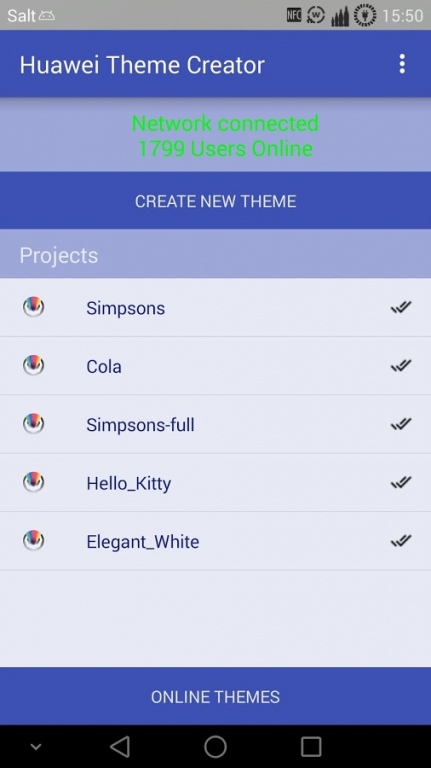
HWT Theme Creator EMOTIONui...
...is the first application on the world for device hardcore modification on Huawei devices (Emotion ui)
Emotion UI less then 3.+ support not all features including HWT Theme Creator EMOTIONui!
For all our happy users we made a plugin for Theme Creator EMOTIONui.
(Root) ->Get optimal work for your device with more Ram here:
http://www.makeuseof.com/tag/add-ram-android-device-microsd-card/ <-(Root)
This will boost our services as a external "Main Activity"
get the plugin here: http://tcemui.nsd.solutions/
Support now android 5.0+ devices!
-Support all Huawei devices (with thememanager)
-Full system ui & framework res customization
-Live editor (beta for some device)
Upload 3.0 Stable Support over 90% Huawei devices
-Customize what you want and everywhere!
-- Important visit this page before Use: http://tcemui.nsd.solutions/help/
This is a BETA Version, if you got some Force Close or incompletely Themes Please dont give bad Rating,
Report your problem here: http://tcemui.nsd.solutions/report-a-problem/
we fix it as soon as possible !
Customization:
- Import theme as material
--Icons
--Icon mask
--Previews
--Unlock styles
--Wallpapers
--Fonts
- Whats-app themer 3 time Trial!
--unlock plugin: https://play.google.com/store/apps/details?id=solutions.huaweithemecreatorwhatspp
- Own Theme Store
- Upload Themes
- Download Themes
- Import Icons from Icon Packs apk's (Google Play)
- Fonts -> Custom (/sdcard/workspace/fonts/"your font.ttf")
- Icon Mask -> Custom (/sdcard/workspace/icons_masks/"your icon mask folder"/)
- APK Icons -> Custom (/sdcard/workspace/icons/"your icon folder"/)
- Autoscan Icons
- Search icons by name (text field)
- Home Background
- Unlock Background
- Unlock Style (more comming soon)
- Notification Background
- Notification Shortcut Icons & Style
- System User Interface
- Systembar bottom icon colors
- Systembar top icon colors
- Support own system & from server
- Notification Live Editor
- Add screenshots to Theme
- Custom signal icon -> Custom (/sdcard/workspace/systemui/signal/"your signal folder"/)
- Custom wifi icon -> Custom (/sdcard/workspace/systemui/wifi/"your wifi folder"/)
- Custom battery icon -> Custom (/sdcard/workspace/systemui/bat/"your bat folder"/)
- Custom systembar icon -> Custom (/sdcard/workspace/systemui/sysbar/"your sysbar folder"/)
- Create theme for other devices!
- Framework Theme
-- Calculator
-- Clock & Widget
-- Contact Theme
-- SMS/MMS Theme
-- Gallery Theme
-- Filemanager Theme
-- Settings Theme
-- Music Theme & Widget background
-- Launcher Theme
-- Weather Theme & Widget background
-- Update Themes Online (only uploaded with 3.5.stable +)
- Image effect: Blur
- Support App2SD & Workspace to sd!
Comming soons:
Facebook theme
Youtube theme
More details at Framework design
Emotion UI less then 3.+ support not all features including HWT Theme Creator EMOTIONui!
About Theme Creator EMOTIONui
The company that develops Theme Creator EMOTIONui is National Swiss Development. The latest version released by its developer is 4.0.8.
To install Theme Creator EMOTIONui on your Android device, just click the green Continue To App button above to start the installation process. The app is listed on our website since 2016-01-12 and was downloaded 0 times. We have already checked if the download link is safe, however for your own protection we recommend that you scan the downloaded app with your antivirus. Your antivirus may detect the Theme Creator EMOTIONui as malware as malware if the download link to nsd.solutions.huaweithemecreator is broken.
How to install Theme Creator EMOTIONui on your Android device:
- Click on the Continue To App button on our website. This will redirect you to Google Play.
- Once the Theme Creator EMOTIONui is shown in the Google Play listing of your Android device, you can start its download and installation. Tap on the Install button located below the search bar and to the right of the app icon.
- A pop-up window with the permissions required by Theme Creator EMOTIONui will be shown. Click on Accept to continue the process.
- Theme Creator EMOTIONui will be downloaded onto your device, displaying a progress. Once the download completes, the installation will start and you'll get a notification after the installation is finished.
Program Details
System requirements
Download information
Pricing
Version History
version 4.0.8
posted on 2016-01-12
4.0.8,Bugfix:,Server connection. (We use a new server)
Disclaimer
External Download
We do not host Theme Creator EMOTIONui on our servers. We did not scan it for viruses, adware, spyware or other type of malware. This app is hosted by Galad and passed their terms and conditions to be listed there. We recommend caution when installing it.
The APK Download link for Theme Creator EMOTIONui is provided to you by apps112.com without any warranties, representations or guarantees of any kind, so access it at your own risk.
If you have questions regarding this particular app contact the publisher directly. For questions about the functionalities of apps112.com contact us.
